The Workflow in One Line
This is the AI production workflow I tested:
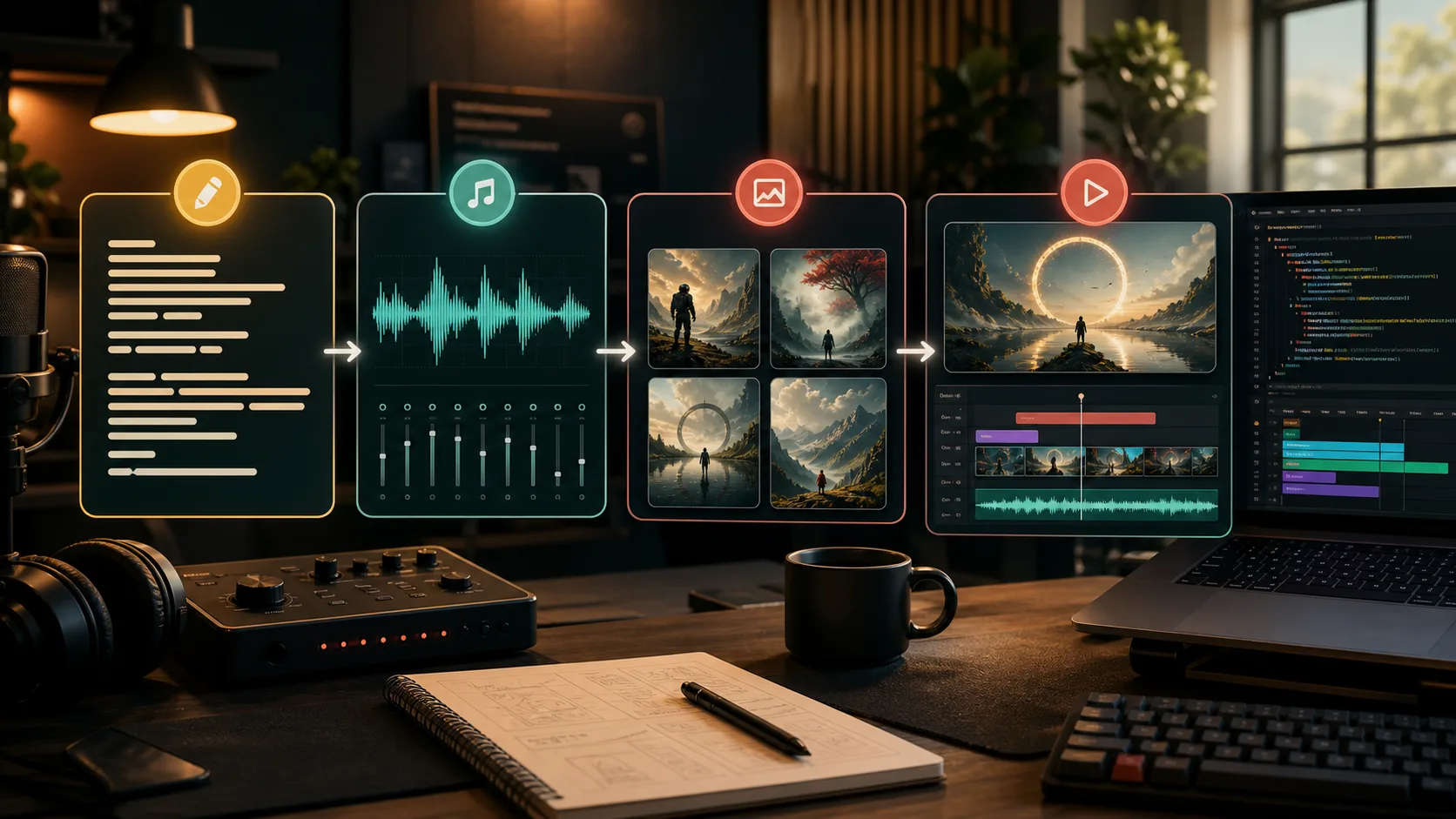
ChatGPT writes the lyrics → Ace-Step 1.5 creates the music → ChatGPT Image 2 creates the visuals → Remotion makes the video.
I was not trying to prove that AI can generate a complete music video with one prompt. I wanted to test something more useful: if I split the music video process into separate stages and use the right AI tool for each stage, can I create a workflow that is more stable, editable and repeatable?
Why I Split the Process
Many AI creation tools position themselves as one-prompt systems for complete works. That idea is exciting, but in real production I care more about control.
A music video has at least four layers:
- The theme and emotion of the lyrics
- The melody, tempo and style of the music
- The characters, scenes and atmosphere of the visuals
- The rhythm, transitions and final video output
If everything is handled by one tool, the first result may be impressive, but revisions can become painful. If I want to change one lyric, the music may need to be regenerated. If I want to change the visual style, the timing may also shift.
So for this experiment, I split the workflow. Each tool has one clear job, and when something goes wrong, I know which stage to revisit.
Step 1: Use ChatGPT for Lyrics
I start with ChatGPT for the lyrics.
Lyrics are not only about writing beautiful lines. For AI music, lyrics also need structure. They need to be singable, and they need to give the music model a clear emotional direction.
I use ChatGPT to help shape:
- The theme
- The tone
- Verse and chorus structure
- Key visual ideas
- Lines that are worth repeating
I do not expect the first draft to be perfect. I prefer to generate a usable version first, then pull out the lines that feel alive and refine them into something closer to my own expression.
Step 2: Use Ace-Step 1.5 for Music
Once the lyrics are ready, I move to Ace-Step 1.5.
Ace-Step 1.5 is responsible for music generation in this workflow. It turns the lyrics and style direction into an actual song.
I pay attention to a few things:
- Is the melody memorable?
- Does the rhythm work for short-form video?
- Do the vocal and instrumental parts sit well together?
- Does the chorus have a clear emotional lift?
One common problem with AI music is that it can sound complete without being memorable. So I do not only check whether the song was generated successfully. I listen closely to the chorus, the opening seconds and the overall energy, because those parts decide whether people keep listening.
Step 3: Use ChatGPT Image 2 for Visuals
After the music direction is set, I use ChatGPT Image 2 to generate the visuals.
This is not about making one beautiful standalone image. It is about creating a visual world for the video. The music already gives me the emotion. The image generation step turns that emotion into visible scenes.
I usually translate the lyrics and music feeling into visual prompts:
- Who is the main character?
- What is the setting?
- Should the colors feel warm, calm or dreamlike?
- Should the look be realistic, cinematic or illustrated?
- What visual change fits each music section?
The key here is consistency. Even if every image looks good by itself, the video will feel scattered if the images look like they belong to different projects.
Step 4: Use Remotion for Video
Finally, I use Remotion to turn the assets into a video.
Remotion is interesting to me because it turns video production into a code-based timeline. Instead of manually dragging everything around in a traditional editor, I can organize visuals through components, timing, parameters and audio rhythm.
In this stage, I handle:
- When each image appears
- Camera movement and scaling
- Lyric or subtitle timing
- Matching visuals to music sections
- Final aspect ratio and export
Remotion works well for this kind of experiment because it makes the process repeatable. If I want to change the song, swap the images or adjust the timing of one section later, I do not need to rebuild the whole edit from scratch.
Why This Workflow Works for Me
The biggest advantage is modularity.
If the lyrics do not work, I go back to ChatGPT.
If the music is weak, I go back to Ace-Step 1.5.
If the visuals are not right, I regenerate them with ChatGPT Image 2.
If the video rhythm feels off, I adjust the Remotion composition.
Each stage has a clear boundary, so the cost of revision is lower. That matters a lot for solo creators because we do not have a large production team, and every experiment cannot require rebuilding everything from zero.
What I Learned from the Experiment
This test made one thing clearer to me: AI creation is not only about generation capability. It is about workflow design.
ChatGPT turns the idea into lyric structure.
Ace-Step 1.5 turns the lyrics into music.
ChatGPT Image 2 turns the musical emotion into visuals.
Remotion organizes the assets into video.
When these stages connect, AI becomes more than one tool. It becomes a small production line. It is not perfect yet, but it is already good enough for testing ideas, making content prototypes and pushing a piece toward something publishable at much lower cost.
FAQ
Why does this workflow focus on openness and control?
Because a music video usually needs multiple rounds of changes. Lyrics, music, visuals and editing all evolve during production. A modular workflow makes it easier to replace one stage without rebuilding the whole piece.
What does Remotion do in this workflow?
Remotion organizes the audio, images, timing and visual movement into a video. It acts like a code-based video composition layer, where I can control the final output with components and a timeline.